Spreadsheets are a remarkable tool. They democratized data analysis and gave plant managers, quality engineers, and production supervisors the power to organize and report on their operations without writing a single line of code. For many manufacturers, they were the first real step toward data-driven decision-making.
But spreadsheets were never built to run a factory floor. They were built to store and calculate data — not to surface it at the right moment, in the right context, to the right person. And the gap between what a spreadsheet can do and what modern manufacturing demands has never been wider.
This guide is for operations leaders, plant managers, and continuous improvement teams who know they need to make the transition — but aren’t sure where to start, what to watch out for, or how to build something that actually sticks.
Why Spreadsheets Are Failing Your Floor
Let’s be precise about the problem. Spreadsheets don’t fail because people use them wrong. They fail because manufacturing operations have outgrown what spreadsheets were designed to do.
In a typical plant, data lives in dozens of disconnected places: your MES, your ERP, your SCADA system, manual operator logs, quality inspection sheets, maintenance ticketing systems. Aggregating all of this into a weekly report means someone — usually a process engineer or a plant analyst — is spending hours every week collecting, cleaning, and formatting data instead of using it.
The other problem is fragility. Spreadsheet-based reporting breaks in predictable ways: a formula gets overwritten, a column gets shifted, someone adds a new production line and forgets to update the template. The report looks right until the moment you need to trust it most.
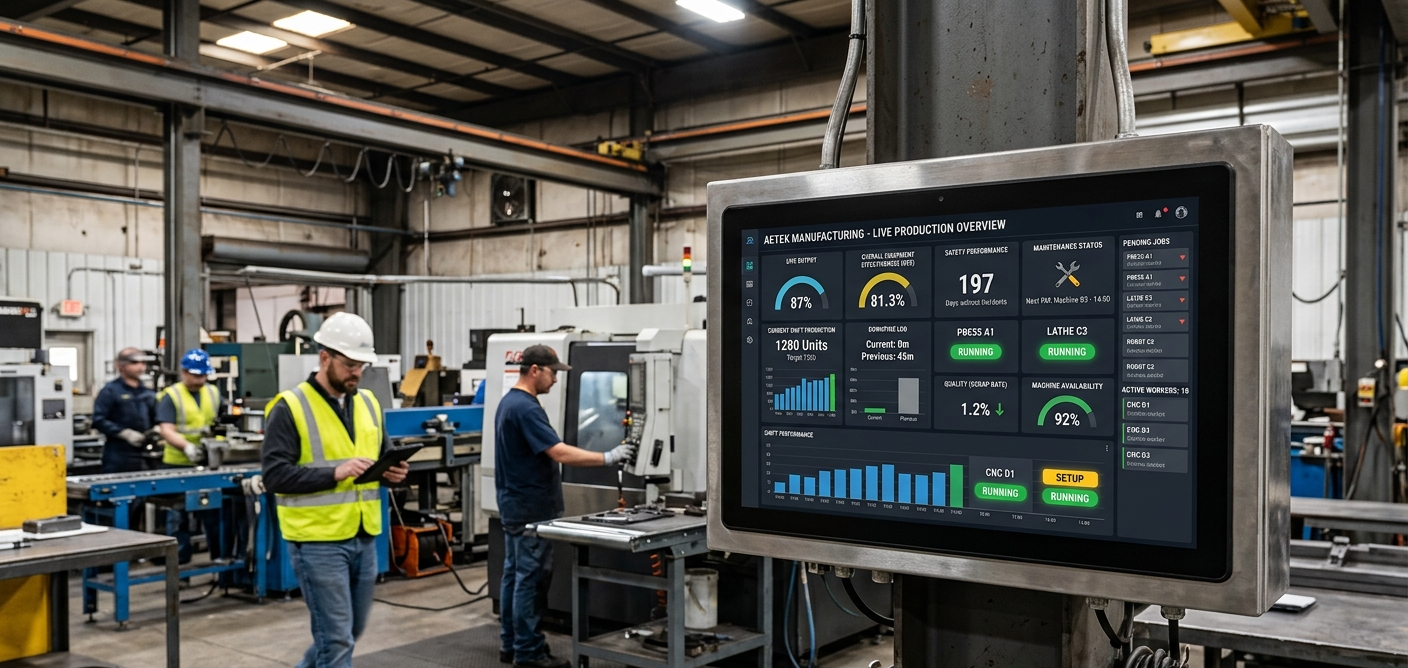
And perhaps most critically: spreadsheets are passive. They show you what happened. Operational dashboards show you what’s happening — and give you the context to decide what to do about it.
Spreadsheets vs. Operational Dashboards
Before committing to a migration, it’s worth understanding exactly what you’re trading and what you’re gaining. This isn’t about technology for its own sake — it’s about whether the tool matches the decision-making speed your operation requires.
| Dimension | Spreadsheet Reporting | Operational Dashboard |
|---|---|---|
| Data freshness | Hourly to weekly, manually compiled | Real-time or near real-time, automated |
| Update effort | Hours of analyst time per cycle | Minimal — data flows automatically |
| Reliability | Breaks on human error or schema changes | Governed pipelines with alerting on failures |
| Audience | Whoever received the file or email | Any authorized stakeholder, on demand |
| Drilldown | Manual pivots and filters | Interactive exploration built in |
| Alerting | Someone has to look at the file | Push notifications on threshold breaches |
| Historical trend | Limited by file size and manual merging | Months or years of history, queryable |
The Migration Roadmap
The manufacturers who succeed at this transition don’t boil the ocean. They start with a single high-value reporting workflow, get it right, and expand from there. Here’s the framework we use with our clients.
Audit your existing reports — ruthlessly
List every recurring report your team produces or consumes. For each one, ask: Who actually reads it? What decision does it support? How fresh does the data need to be? You will almost certainly find that 40–60% of your reports are generated out of habit, not necessity. Kill those first — they’ll save analyst time without any technology investment.
Identify your highest-leverage starting point
Look for a report that is already being produced regularly, drives meaningful decisions (OEE, downtime, scrap rate, on-time delivery), and has a clear, motivated owner on the business side. This is your pilot. Success here builds organizational confidence and executive sponsorship for the broader rollout.
Map your data sources before touching any tool
Before selecting a dashboard platform or writing a single query, document exactly where each metric in your pilot report comes from, how often the source data updates, and who owns it. Data integration is where most migrations stall. Know your landscape before you commit to an architecture.
Build for the operator, not the analyst
The biggest design mistake manufacturers make is building dashboards that look like pivot tables. Your operators and supervisors don’t want more data — they want faster answers. Design around specific questions: “Is line 3 running to target right now?” “What was our first-pass yield on part number X this week?” Clarity beats comprehensiveness every time.
Run the old and new systems in parallel — briefly
When you launch your first dashboard, keep the spreadsheet running alongside it for two to four weeks. This isn’t lack of confidence — it’s validation. It lets stakeholders trust the new numbers, surface discrepancies early, and transition their habits without a hard cutoff. After validation, retire the spreadsheet deliberately and visibly.
Govern the dashboard as a data product
A dashboard that nobody trusts is worse than no dashboard at all. Assign an owner for each dashboard who is responsible for data quality, metric definitions, and updates when business logic changes. Document your KPI calculations in plain language. Make it easy for users to know exactly what they’re looking at and where it comes from.
Choosing the Right Platform
The market for manufacturing analytics and BI tooling has matured significantly. There’s no single right answer — the best platform for your operation depends on your existing data infrastructure, your IT capacity, and how sophisticated your use cases are likely to become.
If you’re earlier in your data journey
Power BI and Tableau remain the most accessible entry points for manufacturers without dedicated data engineering teams. They connect to a wide range of source systems, have strong manufacturing use case libraries, and can get a pilot dashboard live within weeks rather than months. The limitation is scalability — as your data volumes and pipeline complexity grow, you’ll hit ceilings.
If you have more complex data infrastructure
Platforms like Grafana (particularly strong for time-series/SCADA data), Databricks-connected BI layers, or purpose-built manufacturing analytics platforms (Sight Machine, Factbird, Plex) may offer better long-term fit. These require more technical investment upfront but give you more control over your data model and more headroom as your analytics program matures.
What matters more than platform selection
In our experience, the quality of your data integration work accounts for far more of your outcome than which visualization tool you choose. A well-governed data pipeline feeding a modest BI tool will outperform a sophisticated platform fed by messy, unvalidated data every single time. Invest in the foundation before you optimize the surface.
Common Pitfalls — and How to Avoid Them
Migrating the spreadsheet rather than rethinking it. The most common failure mode: taking a 40-column spreadsheet and rebuilding it pixel-for-pixel in a BI tool. The result is a dashboard nobody uses because it’s just as hard to read as what came before. Use the migration as a forcing function to redesign the report from the user’s perspective.
Undefined metric definitions. “OEE” means different things at different plants, and even at different lines within the same plant. If your dashboard doesn’t document exactly how each metric is calculated — planned downtime inclusions, shift assumptions, scrap categorization — you’ll spend your first three months in arguments instead of driving improvement.
Launching without a change management plan. Technology is the easy part. Getting a shift supervisor who has relied on a spreadsheet for eight years to trust a new system requires intentional onboarding, visible leadership endorsement, and patience. Plan for it rather than assuming adoption will happen organically.
Too many metrics, too little context. Dashboard overload is real. When everything is visible, nothing is actionable. Ruthlessly prioritize: identify the five to eight metrics that actually drive decisions at each level of the organization, and build dashboards around those. You can always add depth through drilldowns rather than cluttering the primary view.
Ignoring the data quality problem. Dashboards surface bad data faster and more visibly than spreadsheets. Before you go live, audit your source data quality and build data validation checks into your pipelines. A dashboard that shows obviously wrong numbers will erode trust faster than any spreadsheet ever did.
What Good Looks Like
When this transition succeeds, you’ll see a few things happen that are worth naming explicitly, because they tend to surprise leadership teams.
First, the conversation in your operations reviews shifts. Instead of spending the first 20 minutes of every meeting arguing about whose numbers are right, you spend those 20 minutes discussing what to do about a problem you all agree exists. Shared data changes meeting dynamics in ways that are hard to appreciate until you’ve experienced them.
Second, your improvement initiatives get faster. When you can see the impact of a process change within hours rather than waiting for the next weekly report, your PDCA cycles compress. Teams get faster feedback, faster learning, and faster results.
Third, and perhaps most importantly, you start to shift from reactive to proactive operations. When your dashboard surfaces a degrading trend in first-pass yield before it becomes a customer complaint, or shows a piece of equipment whose cycle time variance is trending toward a breakdown, you’ve moved from reporting on the past to influencing the future.
That’s what this transition is ultimately about. Not spreadsheets versus dashboards. Operations that are faster, more reliable, and more transparent than they were before.
Ready to map your own transition?
We work with manufacturers at every stage of this journey — from initial reporting audits to full-scale analytics platform buildouts. If you’re not sure where to start, a two-hour assessment conversation is usually enough to identify your highest-leverage next step.